Code search
Search your projects by what the code does, go to where a name is defined, and open the result in your editor at the line.
EmbeddingGemma 2 reads code too, so DigUp can search your projects. Code search is off until you choose folders for it, and code has an index of its own: it never shows up in your other searches, and your other files never show up in it.
Turn it on
Choose the folders that hold your repositories in Settings → Code on a Mac, or under Code folders in Settings → Folders on Windows and Linux; setup offers it too when your computer has code projects. Each repository shows how long reading it will take and how much room its index needs, before anything runs. On a Mac a small app takes about 20 seconds, and all of llama.cpp about 20 minutes and 130 MB of index. Code folders are read after your other folders.
Search
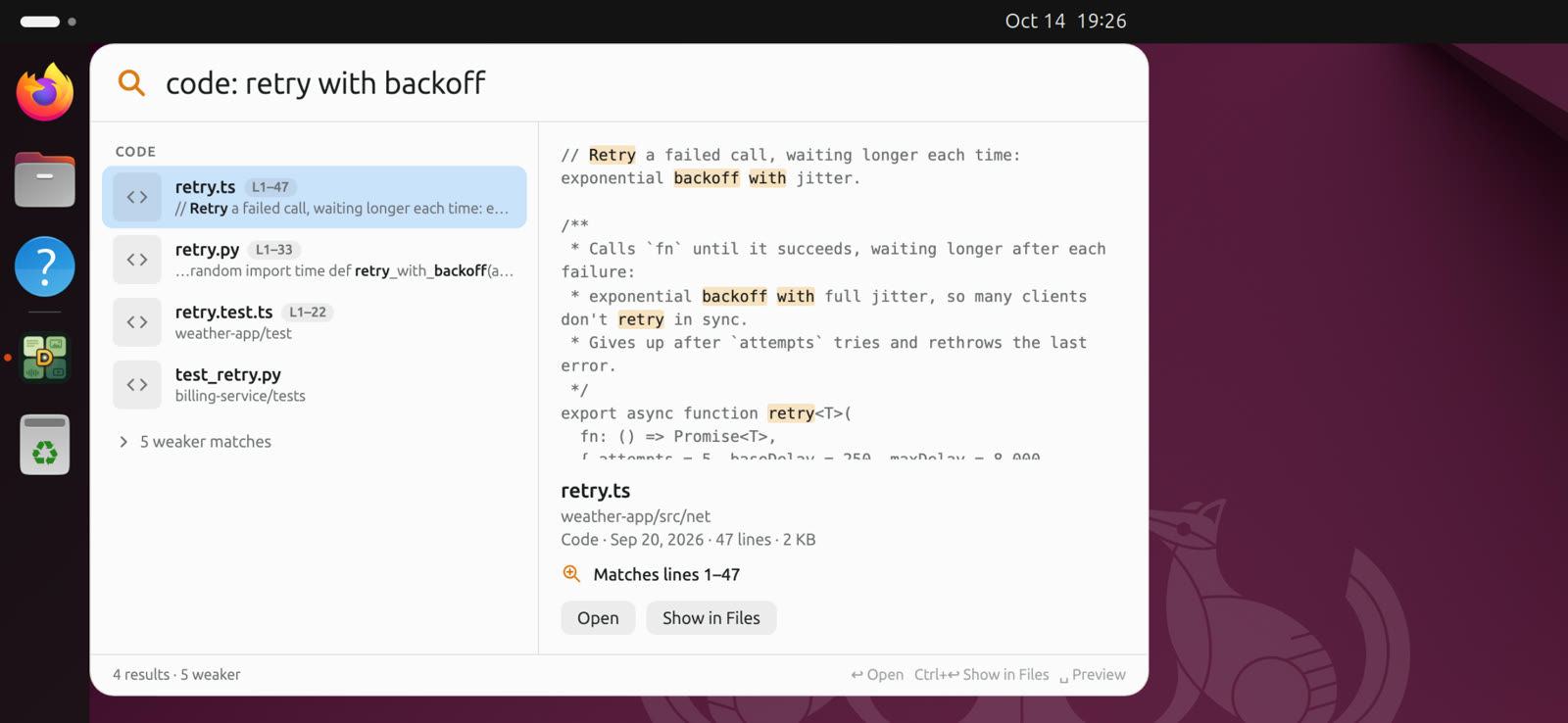
Start a search with code:, or pick the Code filter in the search window. Then:
- say what the code does: "code: retry a failed call with backoff" finds the function, whatever it's called.
- type a name that's in it: "code: refreshAccessToken" goes to the line that defines it, not the places that call it.
- describe a notebook cell: "code: plot how many examples each class has".
Results open in your editor at the line. Pick the editor under Open code in: Zed, VS Code, Cursor, Windsurf, VSCodium, Sublime Text and JetBrains IDEs, and on a Mac also Xcode, BBEdit and TextMate, on Windows also Notepad++. On a Mac, until you pick one, DigUp uses the first one it finds, preferring one that's running.
What it reads
Source files, YAML and TOML, a repository's own docs (Markdown, reStructuredText, text), and notebooks, cell by cell, without their outputs. Each stretch of code is read with its path in the repository, which helps the model place it.
It skips what git ignores, vendored and built folders (like vendor/, third_party/, build/, dist/), submodules and worktrees, data files (JSON, CSV, lockfiles, logs), minified and generated code, files over 1 MB, folders with a CACHEDIR.TAG, keys and password files by name, and any file that holds a private key. On a Mac, Skip a Folder… on the Code tab leaves out more.
Keeping up
While you work, files change on every save. The code index catches up a minute after your code goes quiet, and at most every ten minutes while it keeps changing. Changes inside .git, builds and dependencies don't count.
Turning it off
Turn Off Code Search deletes the code index. Turning it on again reads the code again.