Download DigUp
Free and open source. The app is small; the model (865 MB) downloads once, on first launch, while you pick the folders to search.
Mac
DigUp for Mac
Version 0.6.2Needs an Apple Silicon Mac (M1 or later) with macOS 14 or later. Signed with a Developer ID and notarized by Apple.
043033bdbe0c7c5fcb56545711c19d0ccf2cb9be58798d0e47f7c35e902cc5fdOr with Homebrew:
brew install --cask arahim3/tap/digupInstall
- Open the DMG and drag DigUp to Applications.
- Open DigUp. While the model downloads, pick the folders to search; each shows how long its first pass will take.
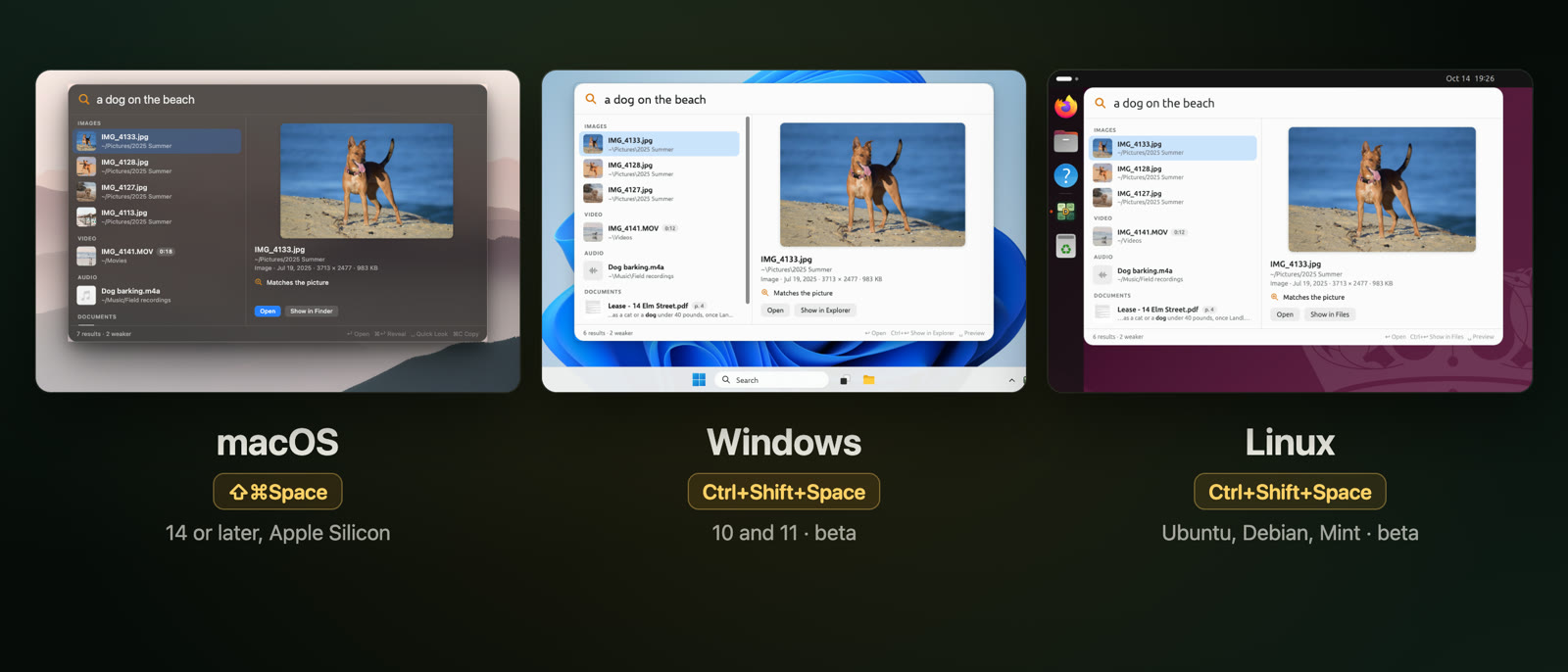
- Press ⇧⌘Space in any app and describe what you're looking for.
Windows
DigUp for Windows
Beta 0.7.0-beta.3Needs 64-bit Windows 10 or 11. Installs for you only, with no admin rights.
013ee9bdc08eb1256cb1b49b0ec11549ae7929f07536e18fbc14fe46d6059fe1Install
- Run the installer. It adds DigUp to the Start menu and the tray.
- Open DigUp. While the model downloads, pick the folders to search. A quick check decides whether the model runs on your graphics card or the processor.
- Press CtrlShiftSpace in any app and describe what you're looking for.
Linux
DigUp for Linux
Beta 0.7.0-beta.3Needs a 64-bit Intel or AMD processor: Ubuntu 22.04, Debian 12, Mint 21 or newer for the .deb, and most distributions for the AppImage.
Ubuntu, Debian, Mint and the like
81396e63fd92601dffe4b65c6b9a2e496bcfda2d188eb24220a2431b68e03bd8sudo apt install ./DigUp_0.7.0-beta.3_amd64.debAny other distribution
f41d4a54b987371b22e5a26ae6fe4968d0e3c4fd7f63c6580441f257278cdb6fchmod +x DigUp_0.7.0-beta.3_amd64.AppImage && ./DigUp_0.7.0-beta.3_amd64.AppImageInstall
- Install the .deb with apt (the package is called
dig-up), or make the AppImage executable and run it. - Open DigUp. While the model downloads, pick the folders to search.
- Press CtrlShiftSpace. On GNOME and KDE under Wayland, DigUp adds it to the desktop's keyboard settings during setup.
What's the same, and what differs
The search is the same everywhere: the same model, the same ranking, the same results. These are the differences.
| Mac | Windows | Linux | |
|---|---|---|---|
| Search by meaning: photos, screenshots, PDFs, documents, spreadsheets, slides, audio and video | Yes | Yes | Yes |
| Exact words in file names and document text | Yes | Yes | Yes |
| Text inside screenshots and scanned PDF pages | Apple's text recognition | Not yet | Not yet |
| Old Word .doc files, RAW photos, SVG pictures | Yes | Not yet | Not yet |
| Code search | Yes | Yes | Yes |
| Where the model runs | GPU (Metal) | Graphics card (Vulkan) when faster, else processor | Graphics card (Vulkan) when faster, else processor |
| Videos and recordings open at the moment in | QuickTime Player, IINA | VLC, mpv, MPC-HC | VLC, mpv |
| PDFs open | In Preview, with your words searched | At the page in Edge, Chrome, Firefox, Acrobat or SumatraPDF | At the page in Evince, Papers, Okular, Firefox or Chrome |
| Updates | One click | One click | One click with the AppImage; the .deb opens the release page |
| Search shortcut | ⇧⌘Space | Ctrl+Shift+Space | Ctrl+Shift+Space (on GNOME and KDE under Wayland, in the desktop's settings) |
| Status | Stable | Beta | Beta |
Checking a download
Every file comes from GitHub Releases, which shows each one's SHA-256; the ones above are copied from there. Compare with shasum -a 256 on a Mac or Linux, or certutil -hashfile <file> SHA256 on Windows. Updates are signed, and an installed copy refuses one that isn't.
Updates
DigUp checks once a day and installs a new version with one click: the Mac app, the Windows installer and the AppImage update themselves. With the .deb, DigUp opens the release page for you. How updates and betas work
Older versions and source
Every release and its notes are in the changelog and on GitHub. To build DigUp yourself, see building from source.